74 lines
3.0 KiB
Markdown
74 lines
3.0 KiB
Markdown

|
|
|||
|
|
|
|||
|
|
# Introduction
|
|||
|
|
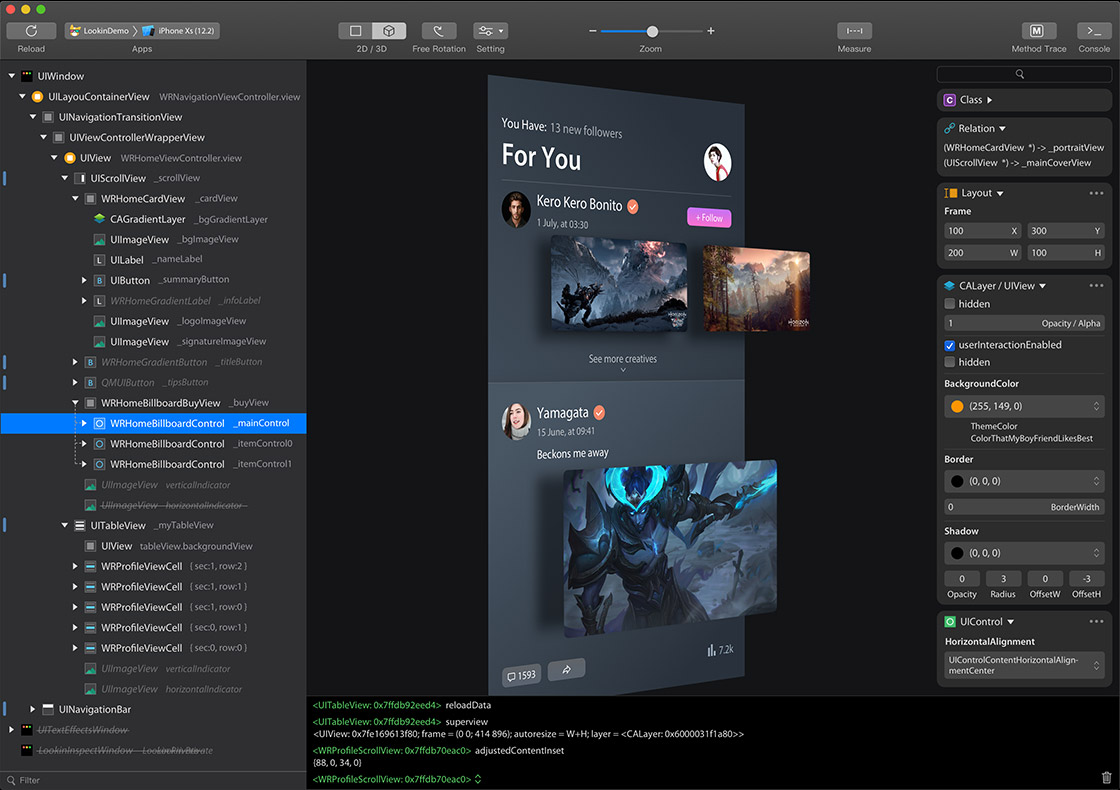
You can inspect and modify views in iOS app via Lookin, just like UI Inspector in Xcode, or another app called Reveal.
|
|||
|
|
|
|||
|
|
Official Website:https://lookin.work/
|
|||
|
|
|
|||
|
|
# Integration Guide
|
|||
|
|
To use Lookin macOS app, you need to integrate LookinServer (iOS Framework of Lookin) into your iOS project.
|
|||
|
|
|
|||
|
|
> **Warning**
|
|||
|
|
> 1. Never integrate LookinServer in Release building configuration.
|
|||
|
|
> 2. Do not use versions earlier than 1.0.6, as it contains a critical bug that could lead to online incidents in your project: https://qxh1ndiez2w.feishu.cn/wiki/Z9SpwT7zWiqvYvkBe7Lc6Disnab
|
|||
|
|
|
|||
|
|
## via CocoaPods:
|
|||
|
|
### Swift Project
|
|||
|
|
`pod 'LookinServer', :subspecs => ['Swift'], :configurations => ['Debug']`
|
|||
|
|
### Objective-C Project
|
|||
|
|
`pod 'LookinServer', :configurations => ['Debug']`
|
|||
|
|
## via Swift Package Manager:
|
|||
|
|
`https://github.com/QMUI/LookinServer/`
|
|||
|
|
|
|||
|
|
# Repository
|
|||
|
|
LookinServer: https://github.com/QMUI/LookinServer
|
|||
|
|
|
|||
|
|
macOS app: https://github.com/hughkli/Lookin/
|
|||
|
|
|
|||
|
|
# Tips
|
|||
|
|
- How to display custom information in Lookin: https://bytedance.larkoffice.com/docx/TRridRXeUoErMTxs94bcnGchnlb
|
|||
|
|
- How to display more member variables in Lookin: https://bytedance.larkoffice.com/docx/CKRndHqdeoub11xSqUZcMlFhnWe
|
|||
|
|
- How to turn on Swift optimization for Lookin: https://bytedance.larkoffice.com/docx/GFRLdzpeKoakeyxvwgCcZ5XdnTb
|
|||
|
|
- Documentation Collection: https://bytedance.larkoffice.com/docx/Yvv1d57XQoe5l0xZ0ZRc0ILfnWb
|
|||
|
|
|
|||
|
|
# Acknowledgements
|
|||
|
|
https://qxh1ndiez2w.feishu.cn/docx/YIFjdE4gIolp3hxn1tGckiBxnWf
|
|||
|
|
|
|||
|
|
---
|
|||
|
|
# 简介
|
|||
|
|
Lookin 可以查看与修改 iOS App 里的 UI 对象,类似于 Xcode 自带的 UI Inspector 工具,或另一款叫做 Reveal 的软件。
|
|||
|
|
|
|||
|
|
官网:https://lookin.work/
|
|||
|
|
|
|||
|
|
# 安装 LookinServer Framework
|
|||
|
|
如果这是你的 iOS 项目第一次使用 Lookin,则需要先把 LookinServer 这款 iOS Framework 集成到你的 iOS 项目中。
|
|||
|
|
|
|||
|
|
> **Warning**
|
|||
|
|
>
|
|||
|
|
> 1. 不要在 AppStore 模式下集成 LookinServer。
|
|||
|
|
> 2. 不要使用早于 1.0.6 的版本,因为它包含一个严重 Bug,可能导致线上事故: https://qxh1ndiez2w.feishu.cn/wiki/Z9SpwT7zWiqvYvkBe7Lc6Disnab
|
|||
|
|
## 通过 CocoaPods:
|
|||
|
|
|
|||
|
|
### Swift 项目
|
|||
|
|
`pod 'LookinServer', :subspecs => ['Swift'], :configurations => ['Debug']`
|
|||
|
|
### Objective-C 项目
|
|||
|
|
`pod 'LookinServer', :configurations => ['Debug']`
|
|||
|
|
|
|||
|
|
## 通过 Swift Package Manager:
|
|||
|
|
`https://github.com/QMUI/LookinServer/`
|
|||
|
|
|
|||
|
|
# 源代码仓库
|
|||
|
|
|
|||
|
|
iOS 端 LookinServer:https://github.com/QMUI/LookinServer
|
|||
|
|
|
|||
|
|
macOS 端软件:https://github.com/hughkli/Lookin/
|
|||
|
|
|
|||
|
|
# 技巧
|
|||
|
|
- 如何在 Lookin 中展示自定义信息: https://bytedance.larkoffice.com/docx/TRridRXeUoErMTxs94bcnGchnlb
|
|||
|
|
- 如何在 Lookin 中展示更多成员变量: https://bytedance.larkoffice.com/docx/CKRndHqdeoub11xSqUZcMlFhnWe
|
|||
|
|
- 如何为 Lookin 开启 Swift 优化: https://bytedance.larkoffice.com/docx/GFRLdzpeKoakeyxvwgCcZ5XdnTb
|
|||
|
|
- 文档汇总:https://bytedance.larkoffice.com/docx/Yvv1d57XQoe5l0xZ0ZRc0ILfnWb
|
|||
|
|
|
|||
|
|
# 鸣谢
|
|||
|
|
https://qxh1ndiez2w.feishu.cn/docx/YIFjdE4gIolp3hxn1tGckiBxnWf
|